Demo Setups
The Demo Setups section at the bottom of the N-panel provides one-click procedural scene generators. These presets serve as instant learning templates, interactive playgrounds, and production starting points.
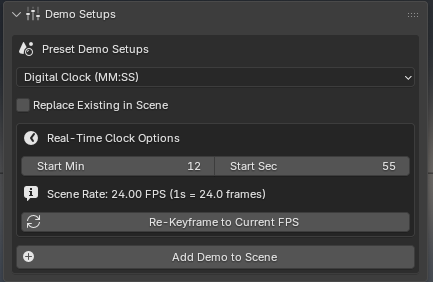
How to Use the Generator
Open the Reactive Surface FX tab in the 3D Viewport sidebar (N panel).
Scroll to the Demo Setups panel.
Select your desired setup from the Preset Demo Setups dropdown.
Replace Existing in Scene: Check this option if you want to cleanly clear an existing demo setup before creating a new one.
Click Add Demo Setup.
Press Spacebar to play the animation and watch the demo run in real time!
Available Demo Presets
Demo Preset |
Highlight Features & Walkthrough |
|---|---|
Custom 7-segment digital time display driven by animated mechanical driver blades with phosphor decay afterglow. |
|
Three parallel grids showcasing Faceted, Smooth, and Texture Canvas modes under bouncing physics with Push Normal displacement. |
|
3D UV rubber stamp and reveal displays on flat, convex, and concave cradle surfaces. |
|
High-speed rotational spoke persistence-of-vision display simulating human eye integration via progressive vertex group activation. |
|
Real-time bioluminescent glow inside cascading fluid simulation reservoirs using depth penetration sensing. |
|
Cloth physics drape with contact illumination and organic surface wave ripples. |
|
Suspended rotating paint bucket permanently painting multi-color spirograph rosettes onto a floor canvas with Continuous Stroke. |