Physical Transformation
The Physical Transformation panel enables real-time geometric mesh deforming, procedural pinscreen displacement, traveling wave ripples, and 3D object instancing driven by proximity.
Note
This panel appears in the sidebar when the target’s Surface mode is set to Faceted (Pixels).
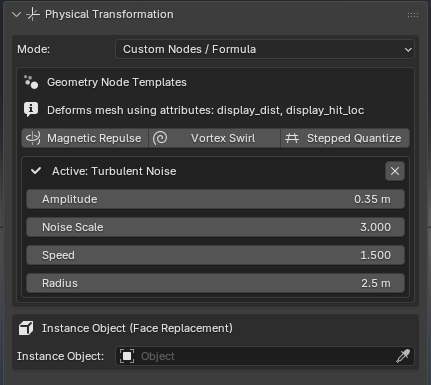
Transformation Modes
Under Mode, choose from several built-in physical deformation behaviors:
1. None (Color Only)
Standard illumination and material transfer without altering polygon vertex positions.
2. Conform to Driver (3D Mold)
Translates and reorients display faces to hug the exact surface topology of approaching driver objects:
Conform Blend (
0.0–1.0): Blends between the rest surface position and the fully conformed mold.Conform Offset: Displaces faces along the normal, allowing the mold to float above or sink below the contact surface.
3. Push Normal (Pinscreen)
Displaces faces along their local surface normals based on contact penetration depth:
Max Displacement: Sets the maximum push distance in meters.
Pinscreen Effect: Recreates classic needle pinscreens or tactile executive toys where balls push physical pins downward.
4. Roll / Flip (Mechanical)
Rotates display tiles around their local axes as drivers approach:
Roll Axis: Choose local X, Y, or Z rotation axis.
Max Rotation: Maximum rotation angle in degrees (e.g. 90° for mechanical flip-dots or 180° for revolving billboards).
5. Scale / Iris
Dynamically scales individual faces upon activation:
Scale Factor: Target scale multiplier at full proximity (e.g.
0.0to collapse into open camera apertures, or2.0to expand into overlapping scales).
6. Wave Ripple
Generates concentric procedural traveling wave ripples radiating across the surface from contact impact points:
Amplitude: Peak height of the traveling wave crests.
Frequency: Spatial density of concentric ripple rings.
Speed: Propagation velocity of ripples traveling outward from contact centers.
Radius: Maximum radial distance ripples travel before dying out.
Pre-Scan Timeline Impacts: Analyzes the entire timeline in advance to register impact timestamps, guaranteeing smooth continuous ripple propagation even when drivers move quickly.
7. Turbulent Noise
Creates boiling, organic 4D procedural noise wakes spreading outward from driver contacts:
Amplitude: Maximum displacement of the turbulence.
Noise Scale: Spatial frequency of the procedural noise field.
Speed: Evolution rate of the 4D noise over time.
Radius: Radial reach of the turbulent wake.
8. Custom Nodes / Formula
Hooks into procedural Geometry Nodes networks driven by the standardized mesh attributes display_dist, display_hit_loc, and display_penetration.
Procedural Formula Presets
When Mode is set to Custom Nodes / Formula, one-click procedural presets become available:
Magnetic Repulse: Creates a smooth repulsive crater pushing faces outward away from the driver.
Vortex Swirl: Radial vortex rotating faces smoothly around the contact center.
Stepped Quantize: Quantizes face heights into digital stepped voxel blocks or Lego-like elevation levels.
Object Instancing (Face Replacement)
Rather than displaying base polygon faces, the Instance Object section replaces every active polygon face with full 3D mesh instances:
Select an Instance Object (e.g. an LED bulb, an ornate gemstone, a Suzanne monkey head, or a mechanical pin).
Reactive Surface FX automatically instances the object across all evaluated display faces using hardware-accelerated Geometry Nodes.
Scaling Controls
Uniform (Fit Face): Scales instances uniformly based on polygon surface area and bounding circles, preserving original object proportions (perfect for spheres and crystals).
Fit Face Dimensions: Scales non-uniformly along each polygon’s local width and length. Stretches instances to fill irregular rectangular panels or digital clock segment shapes.
Fixed / Source Scale: Keeps the source object’s unscaled dimensions regardless of face size.
Instance Scale Multiplier: Global size scale adjustment slider.
Grow on Lit (Scale by Proximity): Dynamically modulates instance size based on distance—instances grow as the driver approaches and shrink when it moves away.
Visibility & Orientation
Lit Faces Only: When enabled (default), instances only appear on faces currently illuminated by a driver. Unlit dormant areas remain invisible.
Rotation Offset: Euler XYZ rotation offset to ensure instanced components point in the desired direction.
Material Modes
Inherit Display Light: Instances automatically inherit the display’s emission color and glow with proximity.
Keep Source Material: Instances retain their own original materials and shaders.