Persistence, Sub-Frames & Cache
The Persistence, Sub-Frames & Cache panel controls temporal optical trails, high-speed rotational supersampling, and on-disk simulation baking.
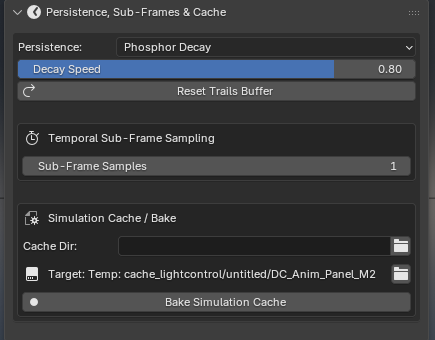
Persistence & Decay Modes
The Persistence dropdown governs how illumination and physical transformations persist over time after a driver departs:
1. None / Instant (Default)
Faces turn off immediately as soon as the driver leaves the proximity radius.
2. Phosphor Decay
Illumination leaves smooth motion trails that fade exponentially over time, modeling the optical phosphor afterglow of cathode-ray tubes, radar screens, and glowing fluorescent tubes:
Decay Speed (
0.01–1.0): Controls how rapidly trails fade per frame (lower = long glowing comet trails, higher = quick fade).Reset Trails Buffer: Clears all active phosphor decay memory instantly.
3. Fixed Time
Illumination stays fully illuminated for an exact duration after the driver departs, then turns off:
Hold Duration Unit: Choose between Frames or Seconds.
Hold Frames / Hold Time: Exact duration the light remains on. Perfect for button presses, elevator floor lights, and footprint steps.
4. Permanent
Illumination accumulates permanently across the timeline without decaying. Essential for digital painting canvases, graffiti walls, and laser writing (as featured in the Bucket Painting demo).
Temporal Sub-Frame Supersampling
High-speed animations (such as fast-spinning wheels, bullets, rapid bouncing balls, and persistence-of-vision displays) can cause standard integer frame sampling to miss contact points or create stuttered trails.
Sub-Frame Samples (1 – 64×)
1×: Standard integer frame evaluation (standard playback).
2× – 8×: Smooths fast linear motion and prevents tunneling through thin geometries.
16× – 64×: Ultra-high temporal resolution for high-RPM rotational strobe drivers, ballistic impacts, and continuous arc sweeps.
Sub-Frame Modes
Under Sub-Frame Mode, choose how fractional samples are integrated:
Auto (Recommended): Automatically chooses Peak Impact when persistence is off, and Temporal Accumulation when persistence is active.
Peak Impact / Min Distance (
PEAK): Tracks the closest geometric approach and highest illumination intensity across all sub-steps within the frame. Guarantees that fast objects bouncing off a surface at high velocity register maximum contact brightness without tunneling.Temporal Accumulation (
ACCUMULATE): Continuously blends and accumulates all fractional sub-steps through the decay buffer. Essential for simulating optical light trails, laser persistence, and propeller displays.
Simulation Cache & Disk Bake
For complex animations, long renders, or multi-machine render farms, baking the simulation writes pre-computed attribute data directly to disk so frames scrub instantly:
Cache Directory: Specify a custom folder or leave empty to use the default project path:
//cache_lightcontrol/<blend_name>/<object_name>.Bake Simulation Cache: Click to launch a background bake over the timeline frame range with live progress display in the status bar.
Cancel: Safely aborts baking at any frame without corrupting previously baked cache files.
Continue Bake: If a bake was canceled early or the timeline was extended, this button resumes baking from the last cached frame to the end frame.
Free Bake Cache: Clears disk cache files and restores real-time interactive evaluation.